Project: Agent Evaluation Dashboard
Objective
Generate a four-panel static evaluation chart from one strictly validated fictional JSON snapshot: success rate with Wilson 95% intervals, p50/p95 latency and timeout rate, a routing confusion matrix, and cost–success-rate Pareto candidates. The course delivers a PNG actually generated from repository data and script, while retaining reproducible commands for SVG and text alternatives. Automated tests and actual visual reading jointly determine acceptance.
This is not a real-time BI system and does not prove a real Agent’s performance. The exercise focuses on giving every number a denominator, every error a meaning, every color encoding a redundant cue, and exposing quality–latency–cost conflicts.
Files and input contract
- agent_eval_dashboard.py: main script for strict loading, calculation, plotting, and export.
- sample_agent_eval.json: fictional snapshot containing data version, aggregate metrics for three versions, and a routing matrix; it contains no real user data.
- test_agent_eval_dashboard.py: covers input rejection, Wilson intervals, Pareto analysis, chart structure, PNG/SVG/alternative text, and the CLI.
- requirements.txt: pins the direct dependency verified in this update,
matplotlib==3.11.0; it is not a transitive-dependency lockfile. - agent-eval-dashboard.png: the course chart generated from the fixture and manually inspected.
- agent-eval-dashboard-alt.txt: machine-rebuildable text alternative generated from the same data.
The script accepts only 2–5 versions so legends and labels do not overload the chart. Each version needs a unique name, success count, task count, timeout count, p50/p95, and mean cost. It requires success + timeout ≤ task_count, at least one completed run (otherwise p50/p95 are undefined), p95 ≥ p50, and nonnegative cost. Routing labels must be unique; the matrix must be square with nonempty rows, and its total count must equal the selected version’s task count. Unknown fields, duplicate JSON keys, NaN/Infinity, negative counts, and inconsistent totals are rejected.
Run on Windows 11 and PowerShell 7
Run from the project root. The virtual environment, Matplotlib configuration/font cache, and all trial output live in the system temporary directory. The commands neither create a .venv or cache in the vault nor overwrite course artifacts:
$examples = (Resolve-Path '.\docs-EN\data-visualization\examples').Path
$practice = Join-Path $env:TEMP ("ai-agent-viz-{0}" -f [guid]::NewGuid())
$venv = Join-Path $practice 'venv'
$mplConfig = Join-Path $practice 'mplconfig'
$outputDir = Join-Path $practice 'output'

py -3.11 -m venv $venv
$python = Join-Path $venv 'Scripts\python.exe'
& $python -m pip install --upgrade pip
& $python -m pip install -r (Join-Path $examples 'requirements.txt')
& $python -m pip check
New-Item -ItemType Directory -Path $mplConfig, $outputDir -Force | Out-Null

$env:MPLCONFIGDIR = $mplConfig
$env:MPLBACKEND = 'Agg'
& $python -B (Join-Path $examples 'agent_eval_dashboard.py') `
  --data (Join-Path $examples 'sample_agent_eval.json') `
  --output (Join-Path $outputDir 'agent-eval-dashboard.png') `
  --output (Join-Path $outputDir 'agent-eval.svg') `
  --alt-output (Join-Path $outputDir 'agent-eval-dashboard-alt.txt')

& $python -B -m unittest discover -s $examples -p 'test_agent_eval_dashboard.py' -v
& $python -B -O -m unittest discover -s $examples -p 'test_agent_eval_dashboard.py' -v
$env:PYTHONWARNINGS = 'error'
try {
  & $python -B -m unittest discover -s $examples -p 'test_agent_eval_dashboard.py' -v
  & $python -B -O -m unittest discover -s $examples -p 'test_agent_eval_dashboard.py' -v
} finally {
  Remove-Item Env:PYTHONWARNINGS -ErrorAction SilentlyContinue
}
The script explicitly uses the non-interactive Agg backend. The PNG defaults to 300 DPI and exactly 11 × 7.4 inches (3300 × 2220 px); tests assert the exact pixels so a tight bounding box cannot silently change final dimensions. SVG retains vector structure for lines and text, while JPEG is actively rejected. For a paper or publication, still configure the final size, fonts, and format required by the target venue rather than submitting the teaching dashboard unchanged.
Generated result
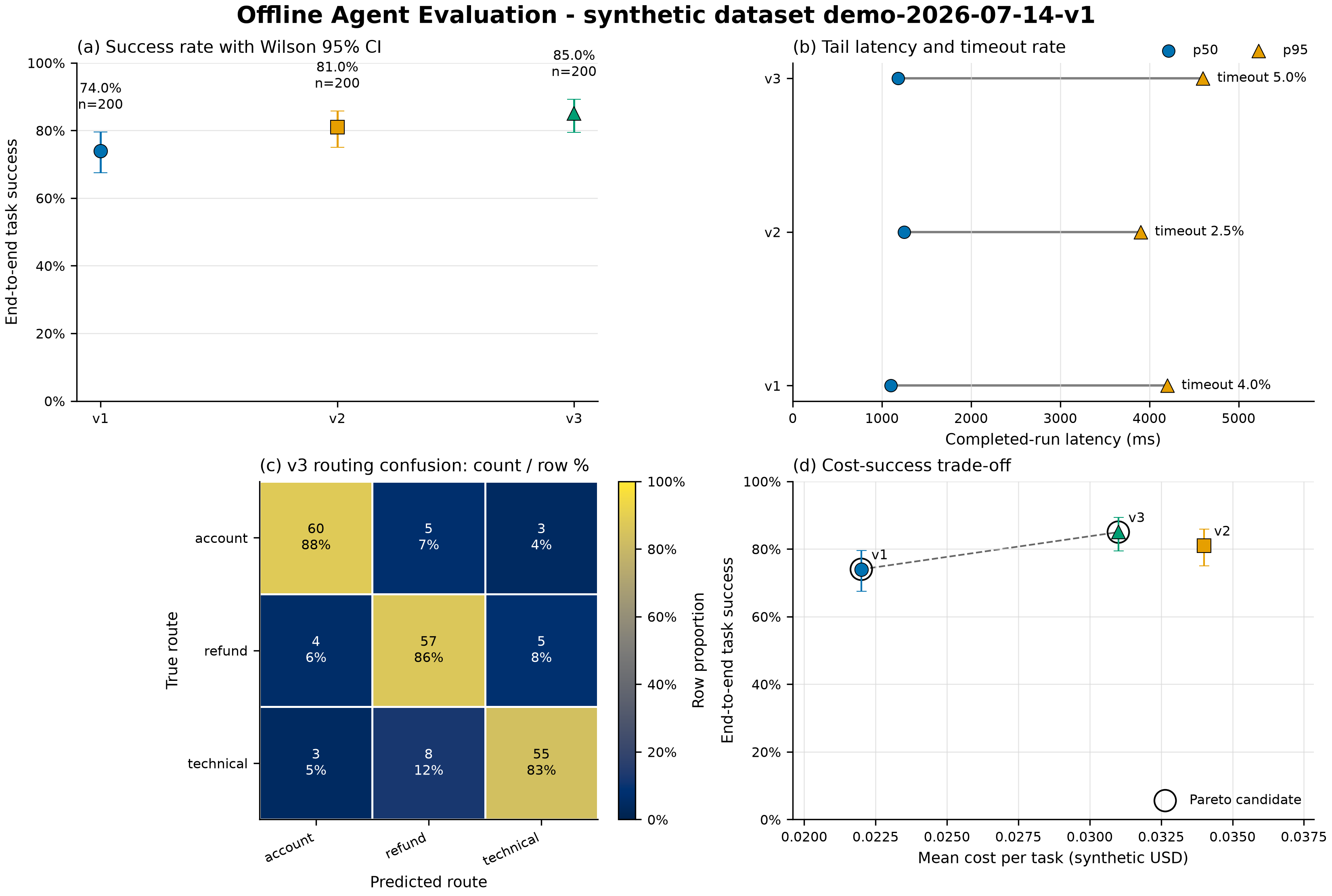
Figure 1. Offline Agent evaluation dashboard, data version demo-2026-07-14-v1, regenerated on 2026-07-18 using Python 3.11.9, Matplotlib 3.11.0, and the commands on this page. The data source is a fictional aggregate fixture in this repository, with no real user or provider results. The chart and data are original teaching artifacts for this project; the repository does not declare a blanket redistribution license, so external reuse needs maintainer confirmation. The regeneration entry point is examples/agent_eval_dashboard.py, and the generation arguments and dependencies are fixed above.
Text alternative: Four panels compare v1, v2, and v3. Their success rates are 74%, 81%, and 85%, with Wilson 95% intervals. v3 has the highest success rate, but it also has the highest p95 latency (4600 ms) and timeout rate (5%). The largest off-diagonal routing error in v3 is 8 technical tasks predicted as refund. Using only lower mean cost and higher success rate, v1 and v3 are Pareto candidates and v2 is dominated by v3. The complete generated English alternative text is in agent-eval-dashboard-alt.txt.
Expected reading
The sample fixes three versions and 200 tasks per version:
- v1/v2/v3 success rates are 74.0%, 81.0%, and 85.0%. Intervals use Wilson 95% CI rather than the boundary-unstable symmetric normal approximation.
- v3 has the highest success rate, but its p95 among completed runs is 4600 ms and its timeout rate is 5.0%, both the highest of the three. Do not declare an overall win from success rate alone.
- The v3 routing matrix contains 200 records; each cell shows both absolute count and row percentage. The largest off-diagonal confusion is 8
technical → refundrecords. - Under the two-dimensional definition “lower cost and higher success,” v1 and v3 are Pareto candidates. v2 is dominated by v3 through lower cost and higher success. This does not mean safety or tail-latency thresholds have been considered.
The command-line summary should include:
dataset=demo-2026-07-14-v1 rates=[v1=74.0%, v2=81.0%, v3=85.0%] pareto=v1,v3Visual self-check loop
- Open the temporary-directory PNG at 100% and confirm all four panels, title, axis labels, legend, colorbar, and cell text are complete.
- Check that (a) error bars are not clipped at their upper bounds; (b)
p50circles andp95triangles remain distinguishable in grayscale; (c) cell text is readable on both dark and light cells; and (d) Pareto hollow rings do not obscure version markers. - Confirm there are no missing-glyph warnings, tick collisions, legends over data, misplaced subplot titles, or canvas clipping.
- Convert the image to grayscale or lower saturation in a system preview and confirm the conclusion does not depend on blue/orange/green themselves.
- Compare
agent-eval-dashboard-alt.txt: its text must derive from the same data snapshot and report the main tradeoff and largest confusion, rather than describing decoration.
Automated tests prove only that structure, file signatures, dimensions, and data calculations meet the contract. They cannot replace perceptual checks in steps 1–5.
Verification for this update
The first verification ran on 2026-07-14 in a temporary venv outside the vault using Python 3.11.9 and Matplotlib 3.11.0. The course PNG and text alternative were regenerated from the same pinned direct dependency on 2026-07-18. An isolated recheck ran on 2026-07-20:
py_compilepassed; 12unittestcases passed in normal and-Omodes withPYTHONWARNINGS=error.- The CLI generated PNG, SVG, and alternative text from the sample JSON; summary, success rates, and Pareto set agreed with hand calculations.
- After removing
bbox_inches="tight", which changes canvas dimensions, a format audit confirmed the PNG is exactly 3300 × 2220 at 300 DPI and that the SVG contains no embedded bitmap. - The first actual reading found that the panel (b) legend obscured v1 data. The legend was moved above the axes and the chart was rendered again. A second color and RGB-grayscale preview showed no legend occlusion, text overlap, clipped error bars, or lost cell-text contrast.
- On 2026-07-18, all 12 tests ran and passed once in normal and
-Omodes with warnings as errors; a manual check of the PNG found no clipping, occlusion, overlap, or low-contrast text. - On 2026-07-20, in an environment outside the vault with Python 3.11.9 and Matplotlib 3.11.0 (this resolution used NumPy 2.4.6 and Pillow 12.3.0), all 12 tests passed once each in normal,
-O,-W error, and-O -W errormodes. These transitive versions are a recheck snapshot, not a complete lockfile. - Tests and plotting do not generate
__pycache__in the knowledge base. The dependency environment, Matplotlib configuration cache, and temporary SVG live in the system temporary directory. The vault retains only the verified PNG, fixture, script, and text alternative.
Extension tasks
- Change one version’s
task_countto 20 while keeping counts consistent, then observe how the Wilson interval widens. - Add a valid fourth sample version and decide whether it enters the Pareto set; do not exceed five versions.
- Add a fourth routing category without changing total task count, then update labels and the 4 × 4 matrix.
- Aggregate p50/p95 and timeout rate from per-task data yourself, and preserve the script that generates the aggregate snapshot; do not hand-edit chart numbers.
- Create a separate panel or report for safety failures; do not dilute serious events with overall success rate.
- Write a 150-word release recommendation that reports improvement, regression, uncertainty, evaluation boundaries, and the next verification step.
Acceptance criteria
- Strict input runs; corrupted or ambiguous input is rejected with a clear error.
- All normal and
-Otests pass and warnings are treated as failures. - PNG, temporary SVG, and alternative text are generated from the same snapshot; the vault retains only verified course PNG and alternative text with clear provenance/license boundaries.
- I can calculate sample success rates by hand and explain the difference between a Wilson interval and an ordinary normal approximation.
- I can identify v3’s quality improvement and its tail-latency/timeout regression without hiding the tradeoff behind a single overall score.
- I have actually read the PNG and grayscale result and confirmed text, layout, and redundant encodings are usable.
Self-check
- Why does panel (a) use points and intervals rather than mean bars starting from zero?
- Does a 95% success-rate interval mean “the true success rate has a 95% probability of lying in this particular interval”?
- What do routing-matrix row percentages and absolute counts each answer?
- Why is v3 dominating v2 still insufficient to decide release?
- How should the eight
technical → refundconfusions return to investigation of per-task samples? - What accessibility/reproducibility problems do SVG and alternative text each solve?
When finished, return to the Data Visualization Index and record the data snapshot, command, dependency versions, and image-inspection result together rather than saving only the final PNG.
References
Sources were checked on 2026-07-20. The example pins the direct dependency Matplotlib 3.11.0; transitive dependencies are still resolved at installation time.